Introduction
The Casap Disputes API (Self-Service) lets members of a partner institution file and track disputes from the partner's own UI.
Requests are REST over HTTPS, take and return JSON, and use standard HTTP status codes. Build against sandbox:
https://api-sandbox.casaphq.com/v1
Every environment has its own host and its own credentials. See Environments.
Recommended integration flow
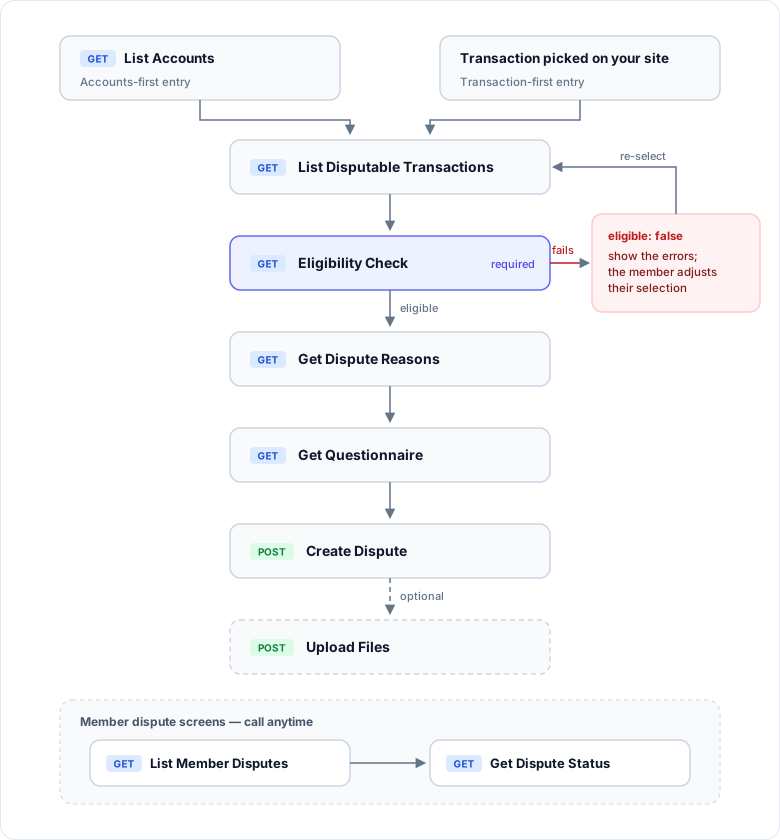
| Step | Purpose |
|---|---|
| 1. List Accounts | Fetch the member's accounts and their accountUuids. Optional — see transaction-first entry below. |
| 2. List Disputable Transactions | Show the member the transactions they can dispute. |
| 3. Eligibility Check | Required. Validate the selection before moving on. |
| 4. Get Dispute Reasons | Show the reason categories that apply to the selection. |
| 5. Get Questionnaire | Show the intake questions for the chosen reason. |
| 6. Create Dispute | File the dispute with the member's answers. |
| 7. Upload Files | Attach supporting documents. Optional. |
Two more endpoints power the member's dispute screens at any time: List Member Disputes (the history list, covering disputes created in the last six months) and Get Dispute Status (full detail and timeline for one dispute).
Transaction-first entry: if the member starts from a transaction already shown on your site, skip List Accounts and build account_uuid yourself: member_id followed by the 4-digit, zero-padded share_id (member 198612 + share 0001 → 1986120001).
Next steps
Authentication
Build the bearer token every request needs.
Environments
Base URLs for each environment and which one to build against.
API Reference
Every endpoint, with request and response schemas.
Webhooks
Get told when a dispute changes, and what to do about it.